

Can i connect my SMS Gateway to Microsoft Exchange Online
ê This connection requires the licensing of the Email to SMS module.
❕ Port 25 have to be forwarded from outside of your network to the SMS Gateway.
-
Log in to the Exchange Control Panel by selecting the URL (https://outlook.office365.com) of Exchange Online.
Change to Message flow - Send connectors
Add a new send connector by clicking on the "+" symbol. -
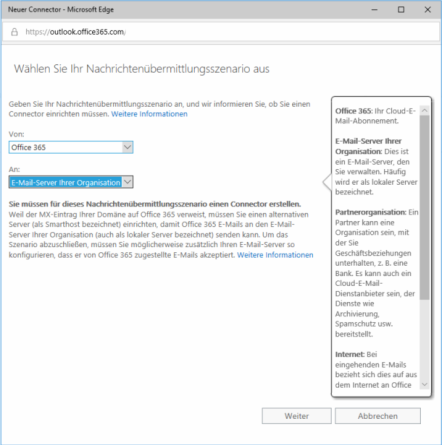
Choose From: Office 365 and To: E-Mail Server of your organisation
-
Choose Only E-Mails sent to this domain and add the domain sms.local with a click on +.
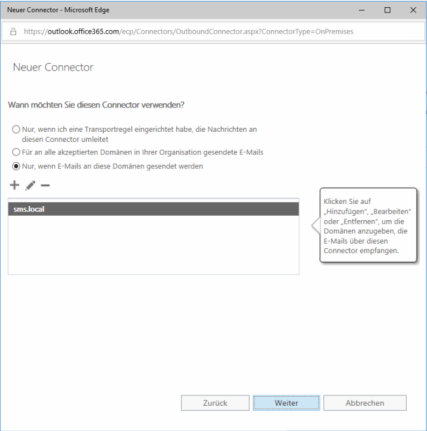
i This domain, sms.local, has to be configured on the SMS Gateway under Configuration > Email to SMS in the input area Accepted Email Domains.
-
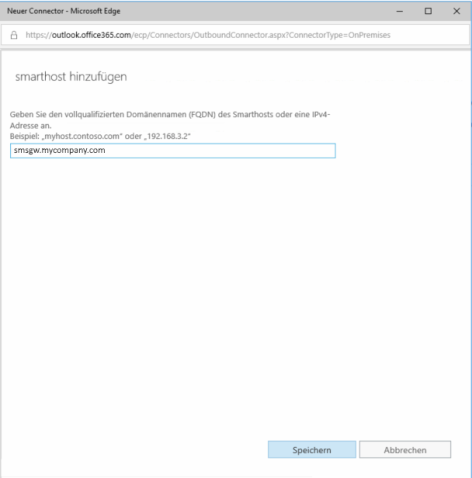
Add the domain your SMS Gateway can be accessed or add a static ip address.
-
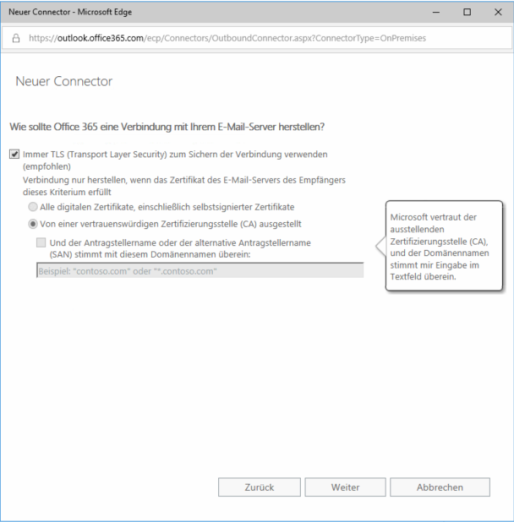
Add All digital certificates, including selfsigned certificates as needed.
-
Conclusive Exchange Online will check th connection to your SMS Gateway with a test email. This email have to be sent to 017012345678@sms.local.